Aircraft Profile
Aici descrii aeronava cu care zbori — identificatorul, tipul, echipamentul și dotările de urgență. Poți ține mai multe profiluri de aeronavă și alegi care este cel activ. Profilul ales este folosit ca să se construiască fiecare plan de zbor pe care îl depui.
Cum ajungi aici: deschide meniul lateral, alege Settings, apoi apasă segmentul Aircraft din partea de sus.
Apasă iconița de ajutor (?) din bara de sus ca să arăți sau să ascunzi indiciul de pe ecran.
Cum alegi o aeronavă
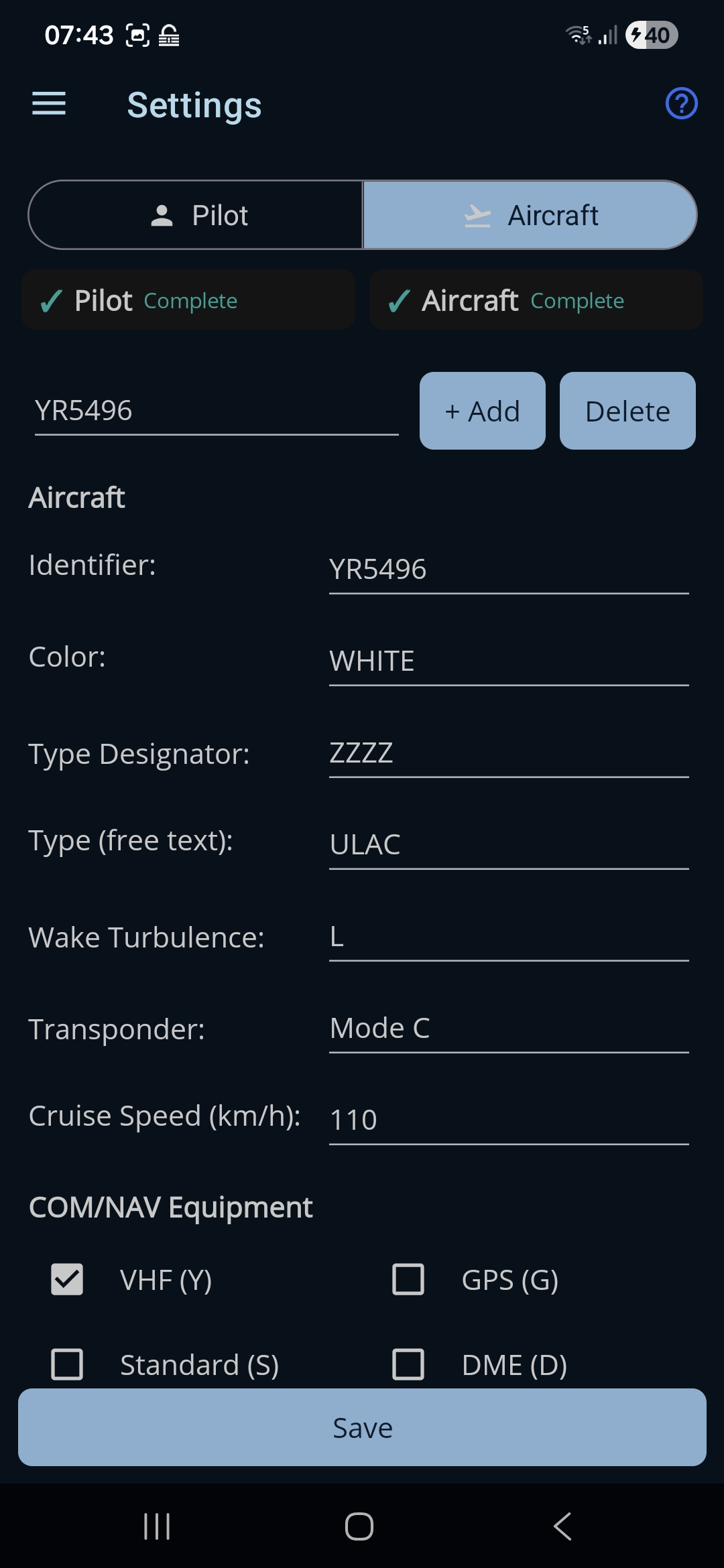
În capul paginii este o bară pentru administrarea profilurilor:
- Selectorul de aeronavă. Îți arată aeronavele salvate, după identificator; cea afișată este aeronava activă, ale cărei date umplu restul formularului. Dacă modifici câmpul Identifier, intrarea din listă se redenumește pe loc.
- + Add. Creează un profil de aeronavă nou, gol.
- Delete. Șterge profilul selectat.
Secțiunea Aircraft
- Identifier. Înmatricularea sau indicativul aeronavei. Obligatoriu, 3–7 litere sau cifre.
- Color. Culoarea și marcajele aeronavei. Obligatoriu.
- Type Designator. Codul ICAO de tip. Folosește ZZZZ dacă tipul tău nu are cod.
- Type (text liber). O descriere în cuvinte a aeronavei (de exemplu „Cessna 172”). Obligatoriu când codul de tip este ZZZZ.
- Wake Turbulence. Categoria de turbulență de siaj, arătată prin codul ICAO: L (ușoară), M (medie), H (grea) sau J (super).
- Transponder. Tipul de transponder montat (None / Mode A / Mode C etc.).
- Cruise Speed. Viteza obișnuită de croazieră a aeronavei, arătată în unitatea de viteză aleasă de tine (eticheta scrie, de exemplu, Cruise Speed (kt) sau (km/h) — o schimbi din Settings → Pilot → Preferences). Obligatorie și într-un interval rezonabil.
Câmpurile greșite primesc o notă roșie și țin butonul Save dezactivat până sunt îndreptate.
COM/NAV Equipment
Bifează fiecare sistem de radio și de navigație pe care îl ai la bord. Literele din paranteze sunt codurile care ajung în planul de zbor: VHF (Y), GPS (G), Standard (S), DME (D), VOR (O), ADF (F) și Other (Z). Trebuie să bifezi cel puțin unul.
Emergency Radio
Bifează frecvențele și balizele de urgență montate: UHF 243.0 MHz, VHF 121.5 MHz și ELT (baliza de localizare de urgență).
Survival Equipment
Bifează echipamentul de supraviețuire aflat la bord: Polar (P), Desert (D), Maritime (M) și Jungle (J).
Life Jacket
Bifează dotările vestelor de salvare: Lights (L), Fluorescein (F), UHF (U) și VHF (V).
Salvarea
- Save. Butonul din josul paginii Settings. Cu secțiunea Aircraft deschisă, salvează aeronava și face din profilul ales sus aeronava activă, folosită la depuneri. Este activ doar când toate câmpurile sunt corecte și este bifat cel puțin un echipament.
← Înapoi la manual · Urmează: Flight Plans →