Pilot Profile
Aici îți ții datele de contact ca pilot și conturile la autoritățile aeronautice. Datele de contact ajung pe fiecare plan de zbor pe care îl depui; conturile îi permit aplicației să depună planuri în numele tău. Sunt două, câte unul pentru fiecare canal de depunere — ROMATSA și AACR (vfr.caa.ro) — și ai nevoie doar de cel (sau cele) pe care le folosești. Tot ce scrii aici rămâne pe dispozitivul tău: fiecare parolă este ținută în stocarea securizată și criptată a telefonului și este trimisă numai portalului căruia îi aparține, niciodată nouă.
Cum ajungi aici: deschide meniul lateral, alege Settings, apoi apasă segmentul Pilot din partea de sus.
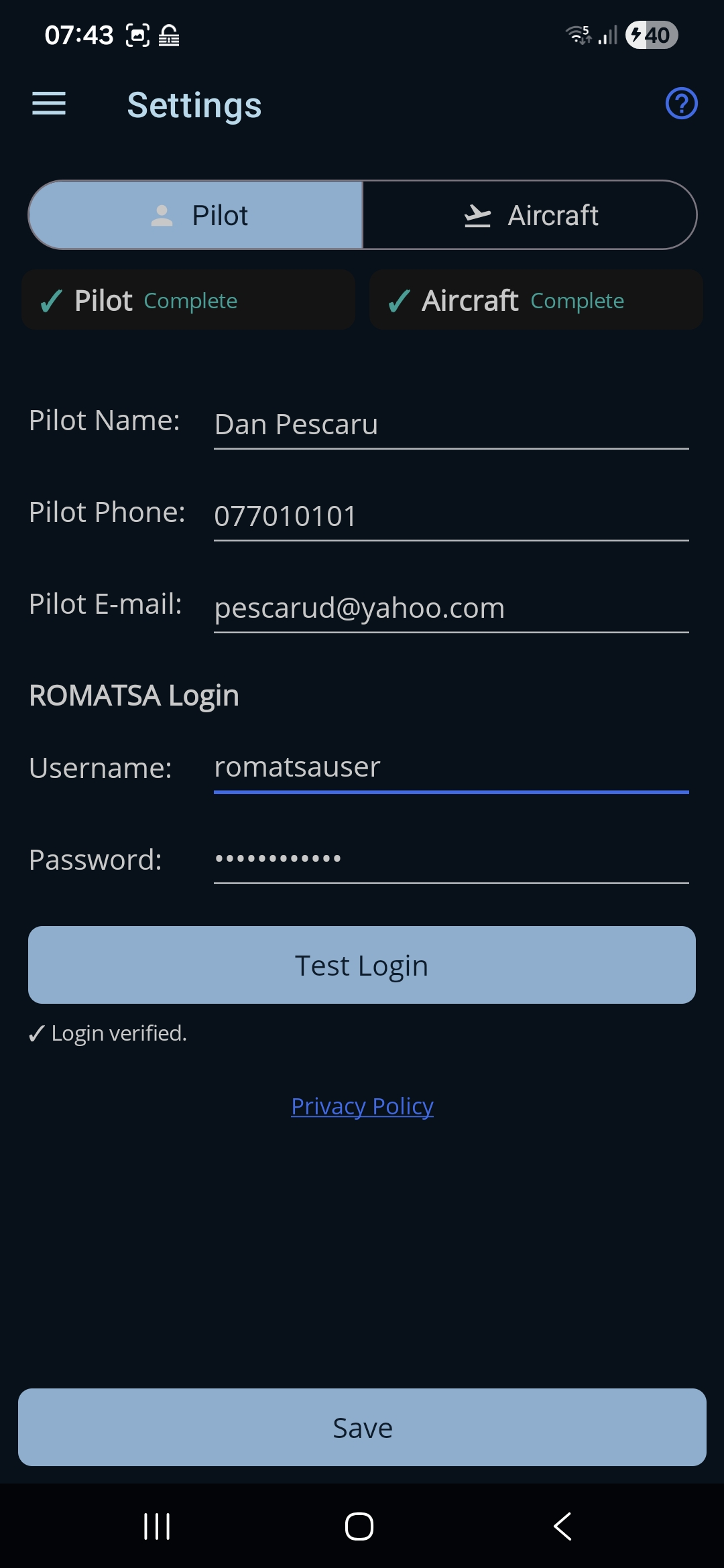
Apasă oricând iconița de ajutor (?) din bara de sus, ca să arăți sau să ascunzi o scurtă amintire a ceea ce face pagina.
Secțiunea Pilot
- Pilot Name. Numele tău, așa cum trebuie să apară pe planul de zbor. Obligatoriu (cel puțin 3 caractere).
- Pilot Phone. Un număr de telefon de contact (deschide tastatura de telefon). Obligatoriu (cel puțin 7 caractere).
- Pilot E-mail. O adresă de e-mail de contact (deschide tastatura de e-mail). Obligatorie și trebuie să conțină un „@” și un „.”.
Dacă un câmp este greșit, apare o notă roșie sub el, iar Save rămâne dezactivat până este îndreptat.
Secțiunea ROMATSA Login
Contul tău pe flightplan.romatsa.ro, folosit ca să depui planuri de zbor ICAO.
- Username. Numele tău de utilizator la contul ROMATSA de planuri de zbor.
- Password. Parola ta de la ROMATSA (ascunsă în timp ce o scrii).
- Test Login. Verifică numele de utilizator și parola la ROMATSA. Devine disponibil după ce ambele câmpuri sunt completate și arată un rând de stare, cu ✓ dacă a mers sau cu ✗ și motivul, dacă nu.
- Starea autentificării. Un rând scurt sub buton, care arată rezultatul ultimului Test Login — ✓ Login verified. sau un ✗ cu motivul.
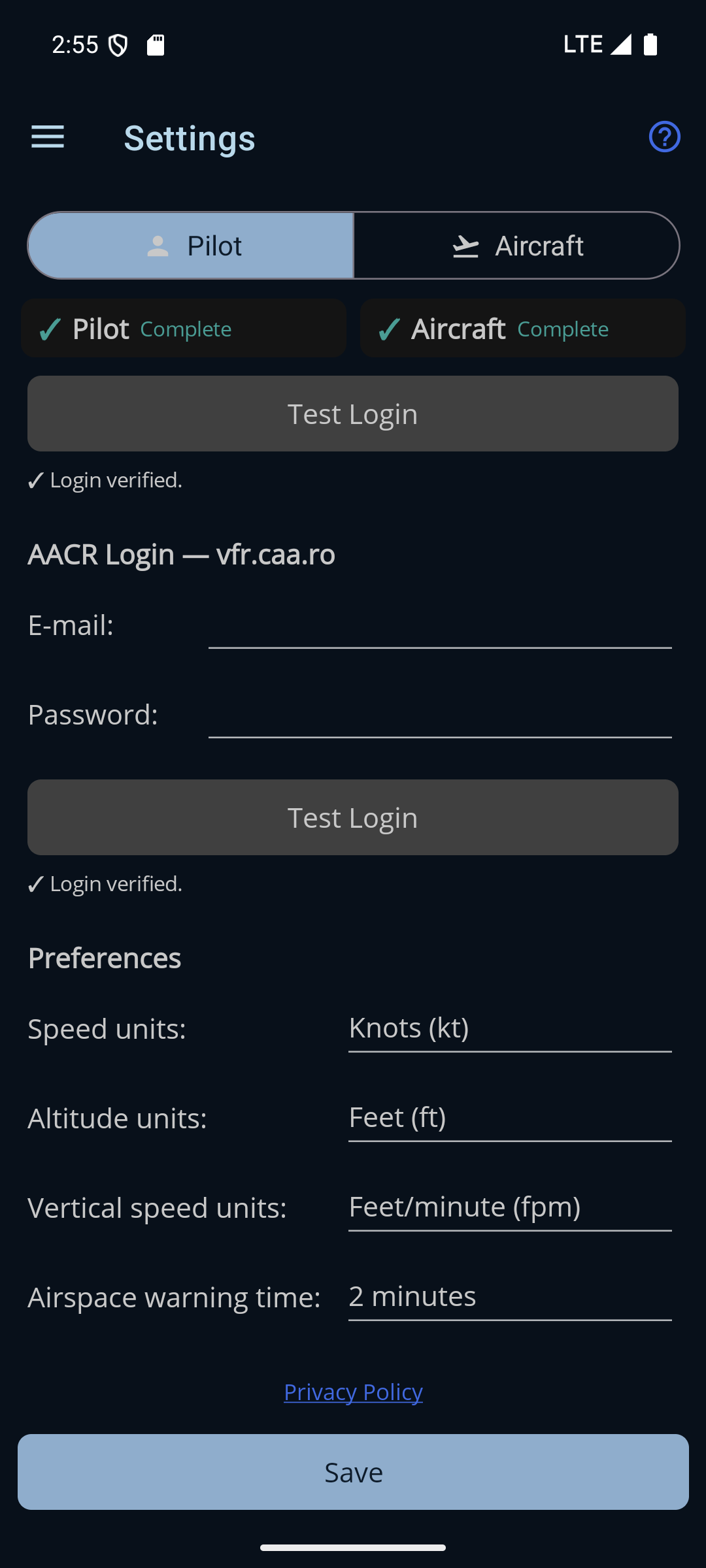
AACR Login — vfr.caa.ro
Contul tău pe vfr.caa.ro, folosit ca să depui notificări VFR pentru zboruri desfășurate în întregime în spațiu aerian clasa G. Acesta este opțional — completează-l doar dacă folosești acel canal.
- E-mail. Adresa de e-mail cu care intri pe vfr.caa.ro.
- Password. Parola ta de pe vfr.caa.ro (ascunsă în timp ce o scrii).
- Test Login. Are butonul lui și rândul lui de stare și funcționează exact ca cel de la ROMATSA, de mai sus.
Pastila ✓ Complete nu ține cont, intenționat, de contul AACR: se face verde imediat ce ai datele de pilot și contul ROMATSA. Un pilot care nu depune niciodată notificări VFR în clasa G nu trebuie bătut la cap pentru un cont de care nu are nevoie.
Preferences
Sub conturi este un bloc Preferences. Primele trei stabilesc unitățile de măsură folosite în toată aplicația; dacă schimbi vreuna, efectul este imediat și se reetichetează fiecare viteză și fiecare altitudine, peste tot — formularul planului de zbor, rezumatul planului, profilul aeronavei, harta și banda de instrumente din Go Fly. A patra nu este o unitate de măsură, dar este același fel de setare: o alegi o dată și o uiți.
Tot ce este în acest bloc se salvează singur în clipa în care îl schimbi — nu așteaptă butonul Save din josul paginii.
- Speed units. Alege Knots (kt) sau Kilometers/hour (km/h); se folosesc pentru fiecare viteză de croazieră și pentru viteza la sol din timpul zborului.
- Altitude units. Alege Feet (ft) sau Meters (m); se folosesc pentru fiecare altitudine.
- Vertical speed units. Alege Feet/minute (fpm) sau Meters/second (m/s); se folosesc pentru indicația V/S (viteza de urcare sau de coborâre) de pe harta Go Fly. Implicit este fpm.
- Airspace warning time. Cu cât timp înainte te avertizează harta Go Fly că direcția în care mergi te-ar duce într-un spațiu aerian activ — 1, 2, 3 sau 4 minute. Implicit sunt 2 minute. Nu există, intenționat, un Off aici: oprirea avertizărilor se face din cardul Settings din timpul zborului, la care ajungi în aer, iar două comenzi care s-ar putea reduce una pe alta la tăcere ar fi mai rele decât una singură.
- Privacy Policy. Deschide politica de confidențialitate Ro Flight în browser.
Salvarea
- Save. Singurul buton din josul paginii Settings. Salvează ambele secțiuni — datele tale de pilot și amândouă seturile de date de portal, și profilul aeronavei — și confirmă cu „Pilot and Aircraft saved.” Este activ doar când toate câmpurile de pilot sunt corecte.
← Înapoi la manual · Urmează: Aircraft Profile →