Aircraft Profile
Where you describe the aircraft you fly — its identifier, type, equipment, and emergency gear. You can keep several aircraft profiles and pick which one is active. The selected profile is used to build every flight plan you submit.
How to get here: open the flyout menu and choose Settings, then tap the Aircraft segment at the top.
Tap the help (?) icon in the top bar to show or hide the on-screen hint.
Choosing an aircraft
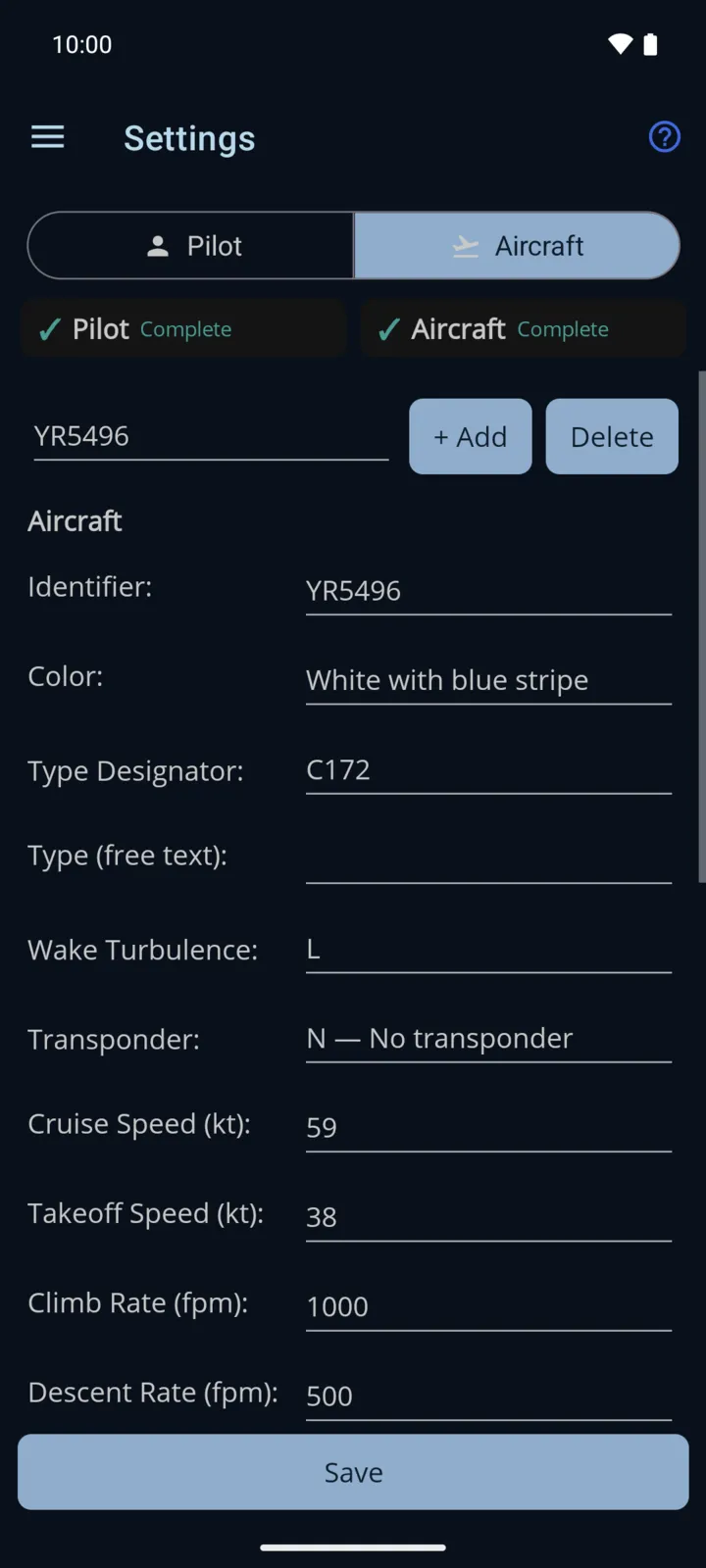
At the top of the page is a bar for managing profiles:
- Aircraft picker. Lists your saved aircraft by identifier; the one shown is the active aircraft whose details fill the rest of the form. Editing the Identifier field renames the entry in this list straight away.
- + Add. Creates a new, blank aircraft profile.
- Delete. Removes the currently selected profile.
Aircraft section
- Identifier. The aircraft registration or callsign (for example a tail number). Required, 3–7 letters/digits.
- Color. The aircraft's colour/markings. Required.
- Type Designator. The ICAO type code. Use ZZZZ if your type has no code.
- Type (free text). A plain-language description of the aircraft (for example “Cessna 172”). Required when the type designator is ZZZZ.
- Wake Turbulence. The wake-turbulence category, shown as its ICAO code: L (Light), M (Medium), H (Heavy), or J (Super).
- Transponder. The surveillance equipment fitted, as ICAO Item 10b. Each entry is shown with the code letter that gets filed: N (none), A (Mode A), C (Mode A + Mode C), and the seven Mode S variants E H I L P S X, which differ by whether the transponder reports aircraft identification, pressure-altitude, extended squitter (ADS-B) and enhanced surveillance. Pick the one matching your avionics paperwork — most modern Mode S installations are S, or E if they also transmit ADS-B.
- Cruise Speed. The aircraft's typical cruise speed, shown in your chosen speed unit (the label reads e.g. Cruise Speed (kt) or (km/h) — switch it under Settings → Pilot → Preferences). Required and within a sensible range.
- Takeoff Speed. The speed at which this aircraft leaves the ground, shown in your chosen speed unit. It files on nothing — it's read only by Flight Report's recorder, to tell when a flight has actually taken off, so a paraglider and a light aircraft are each judged by their own number rather than one fixed threshold. Required and within a sensible range.
- Climb Rate. How fast this aircraft climbs, in your vertical speed unit (the label reads e.g. Climb Rate (fpm)). The terrain profile draws a plan's climbs at this rate and colours the terrain against them, so enter what the aircraft really climbs at. The default is 1000 fpm; between 100 and 3000 fpm.
- Descent Rate. The same for descents. The default is 500 fpm; between 100 and 3000 fpm.
An invalid field shows a red note, and Save leaves the aircraft unsaved until it is corrected.
COM/NAV Equipment
Tick every radio and navigation system you carry. The letters in brackets are the codes filed on the flight plan: VHF (Y), GPS (G), Standard (S), DME (D), VOR (O), ADF (F), and Other (Z). You must select at least one.
Emergency Radio
Tick the emergency frequencies/beacons fitted: UHF 243.0 MHz, VHF 121.5 MHz, and ELT (emergency locator transmitter).
Survival Equipment
Tick the survival gear carried: Polar (P), Desert (D), Maritime (M), and Jungle (J).
Life Jacket
Tick the life-jacket features: Lights (L), Fluorescein (F), UHF (U), and VHF (V).
Saving
- Save. The button at the bottom of the Settings page. It saves both sections; for this one, it stores the aircraft and makes the profile selected at the top the active aircraft used for submissions. The aircraft is not saved while a field is invalid or no equipment is ticked, and the message after Save says so.
← Back to the manual · Next: Flight Plans →